DetailProp Editor
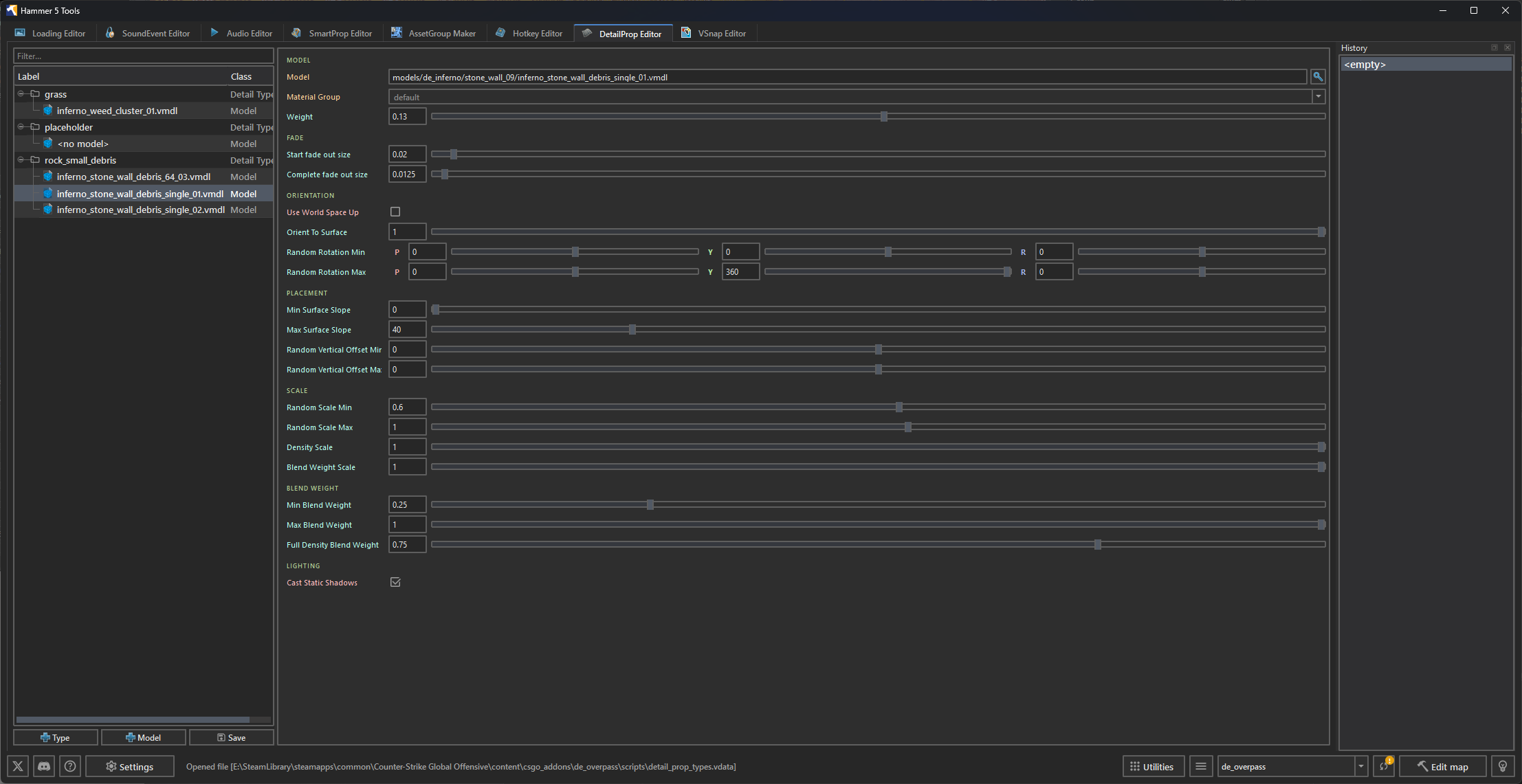
A visual editor for configuring Source 2 detail props in scripts/detail_prop_types.vdata.
Overview
The editor reads and writes the addon's scripts/detail_prop_types.vdata file. Use the hierarchy to create detail types and model entries, then edit the selected item's fields in the property panel.
Interface layout
| Area | Description |
|---|---|
| Hierarchy | Tree of detail types and their model entries. |
| Properties | Fields for the selected detail type or model. |
| History | Dockable undo history. |
Data file
The editor reads and writes:
content/csgo_addons/<addon_name>/scripts/detail_prop_types.vdata
Detail type properties
When a Detail Type node is selected, the editor exposes its density:
| Property | Type | Description |
|---|---|---|
| Density | Float | Number of props placed per square foot. |
Model entry properties
Each detail type can contain multiple model variations. When a Model child node is selected, its fields are grouped as follows:
| Group | Fields |
|---|---|
| Model | Model resource, material group, and weight. |
| Fade | Start and complete fade-out sizes in screen-space units. |
| Orientation | World-space up, orient-to-surface amount, and random rotation min/max. |
| Placement | Minimum/maximum surface slope and random vertical offset. |
| Scale | Random scale, density scale, and blend-weight scale. |
| Blend Weight | Minimum, maximum, and full-density blend weights. |
| Lighting | Whether the model casts static shadows. |
The model's Weight determines its relative frequency within its detail type.
Operations and shortcuts
| Action | Shortcut | Description |
|---|---|---|
| Type button / context menu | — | Adds a detail type after a name is provided. |
| Model button / context menu | — | Adds a model to the selected detail type. |
| Duplicate | Ctrl+D | Duplicates the selected hierarchy item. |
| Delete | Delete | Removes the selected hierarchy item. |
| Undo / Redo | Ctrl+Z; Ctrl+Y or Ctrl+Shift+Z | Reverses or reapplies changes. |
| Save | Ctrl+S | Writes detail_prop_types.vdata. |
Use detail props in Hammer
- Configure the detail types and assign the grass or clutter models in
 Hammer 5 Tools.
 - Save with
Ctrl+S. - In Hammer, open the Material Editor for the blend material (
.vmat). - Open the Detail Props tab and select the detail prop types for the corresponding material layers.
- In the Hammer viewport, enable Toggle Grass / Detail Props to display the detail props across the terrain.