Existing Map Examples
Introduction
:::info Disclaimer
When inspecting Valve’s .vpost files, keep in mind that only Bloom and Tone Mapping settings are directly recoverable!
All other effects (Levels / Curves / Color Balance / etc.) are baked into a Color Lookup Table (LUT) for efficiency, so you’ll only see the final LUT result rather than the original per-layer settings.
(Explained in the Post Processing Editor Guide.)
:::
How to inspect existing .vpost files
Use the  Source2 Viewer to decompile Valve’s shipped
 .vpost files so you can inspect them (and optionally save them into your addon for editing).
Official post processing presets are stored in:
game/csgo/pak01_dir.vpk/lighting/postprocessing/
Remember - the .vpost file is only part of the final result! The post_processing_volume entity settings (especially exposure controls / transitions) also matter. Furthermore, entities like light_environment, env_sky, and env_combined_light_probe_volume also heavily influence the final look by defining the scene’s lighting, sky/atmosphere, and ambient/reflection contribution that the post processing is applied on top of.
Other post processing effects
CS2 also uses post processing for various screen-space gameplay effects. These are stored in: lighting/postprocessing/effects/
Examples include effects used for:
- spectating a player / observer view
- death cam / death-related effects
Official Map Examples
All of these maps use exactly one Master post_processing_volume for their baseline look.
All of these settings were decompiled by the Source2 Viewer.
Train
.vpost file: lighting/postprocessing/de_train_prefab/de_train_postprocess.vpost
post_processing_volume settings:
- Use Exposure Settings:
True - Min Exposure Brightness:
0.8 - Max Exposure Brightness:
1.2 - Exposure Adjustment Speed Up:
0.75 - Exposure Adjustment Speed Down:
0.75 - Transition Time:
1
Example Layer Stack

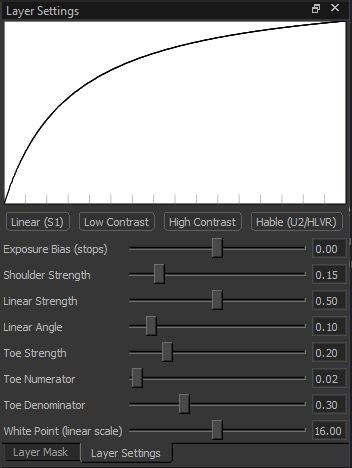
Layer 1 (Top): Tone Mapping
Uses the Hable preset curve.
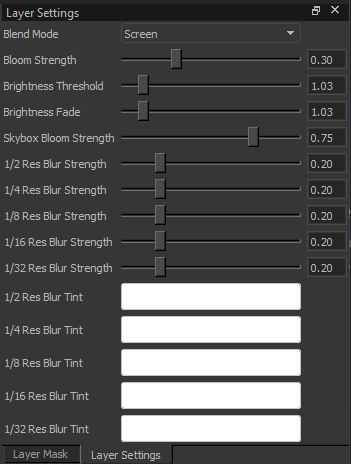
Layer 2: Bloom
- Blend Mode:
Screen - Bloom Strength:
0.30 - Brightness Threshold:
1.03 - Brightness Fade:
1.03 - Skybox Bloom Strength:
0.75 - Res Blur Strengths (1/2 --> 1/32):
0.20 - Res Blur Tints (1/2 --> 1/32):
255 255 255(white)
Layer 3: Lookup Table
Baked LUT resulting from all other effects.

Inferno
.vpost file: lighting/postprocessing/de_inferno_prefab/de_inferno_prefab.vpost
post_processing_volume settings:
- Use Exposure Settings:
True - Min Exposure Brightness:
0.8 - Max Exposure Brightness:
1.1 - Exposure Adjustment Speed Up:
1 - Exposure Adjustment Speed Down:
1 - Transition Time:
1.5
Layer Stack

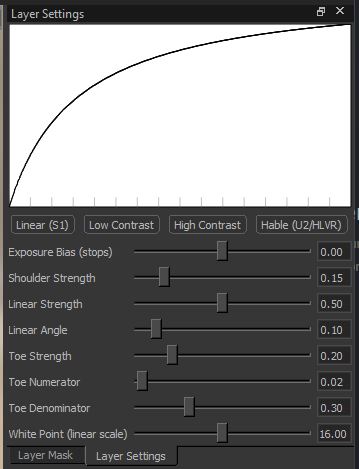
Layer 1 (Top): Tone Mapping
Uses the Hable preset curve.
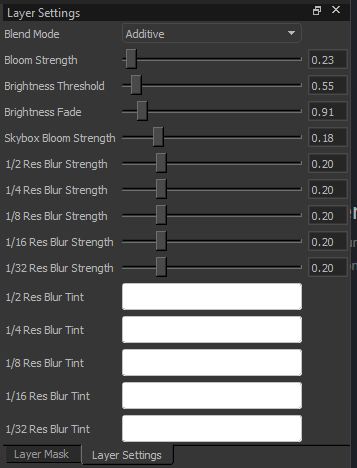
Layer 2: Bloom
- Blend Mode:
Additive - Bloom Strength:
0.23 - Brightness Threshold:
0.55 - Brightness Fade:
0.91 - Skybox Bloom Strength:
0.18 - Res Blur Strengths (1/2 --> 1/32):
0.20 - Res Blur Tints (1/2 --> 1/32):
255 255 255(white)
Layer 3: Lookup Table
Baked LUT resulting from all other effects.

Ancient
.vpost file: lighting/postprocessing/de_ancient_prefab/de_ancient_postprocess_v1.vpost
post_processing_volume settings:
- Use Exposure Settings:
True - Min Exposure Brightness:
1.0 - Max Exposure Brightness:
1.7 - Exposure Adjustment Speed Up:
1 - Exposure Adjustment Speed Down:
1 - Transition Time:
1
Layer Stack
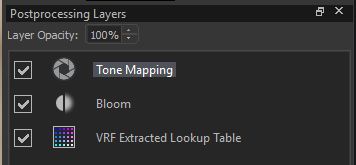
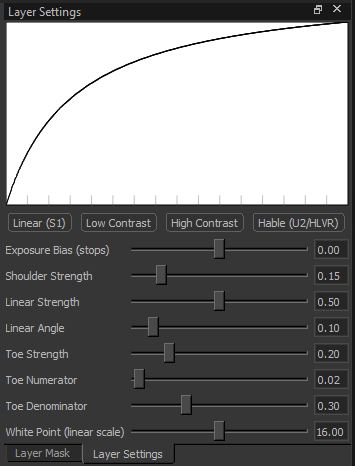
Layer 1 (Top): Tone Mapping
Uses the Hable preset curve.
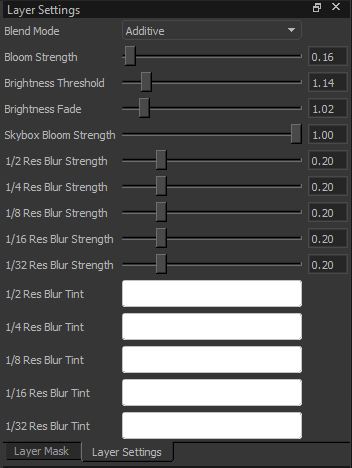
Layer 2: Bloom
- Blend Mode:
Additive - Bloom Strength:
0.16 - Brightness Threshold:
1.14 - Brightness Fade:
1.02 - Skybox Bloom Strength:
1.00 - Res Blur Strengths (1/2 --> 1/32):
0.20 - Res Blur Tints (1/2 --> 1/32):
255 255 255(white)
Layer 3: Lookup Table
Baked LUT resulting from all other effects.
