Jiggle Bone
Procedurally animates a bone or bones as if they are attached to their animated position by a spring. Networking is not used for this node, the spring simulation is performed locally on both the server and the client.

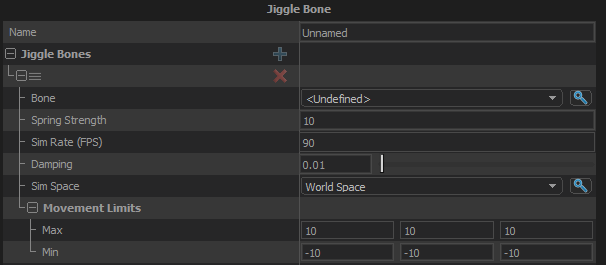
Jiggle Bones
List of bones to simulate. Note that each bone is simulated independently, and they do not affect each other directly.
Bone
The bone to simulate.
Spring Strength
A scale of the force that pulls the bone to its animated position.
Sim Rate (FPS)
The rate at which the simulation is run, in frames per second. If the graph update is longer than this time, multiple sub-step simulations are performed. If the graph update is shorter than this then the sim will use a single step with the same time delta as the graph.
Damping
The rate at which the motion stabilizes. The value represents the amount of energy removed from the simulation each update.
Sim Space
The coordinate system the simulation is performed in. Use the to control how much motion the bone inherit from the movement of the character.
- Local Space: The sim is performed in the bone's local space. Only the animation on the bone itself will affect the simulation
- Model Space: Sim is performed in the coordinate space of the model. The character's full body animation will affect the simulation, but its movement through the world will not
- World Space: Sim is performed in world space. All motion of the characer will affect the simulation
Movement Limits
Movement Limit Max
The farthest that the simulation can move the bone from its animated position in each axis.
Movement Limit Min
How this differs from Movement Limit Max is undocumented.